Tag: data visualisation

Book review: Storytelling with data by Cole Nussbaumer Knaflic

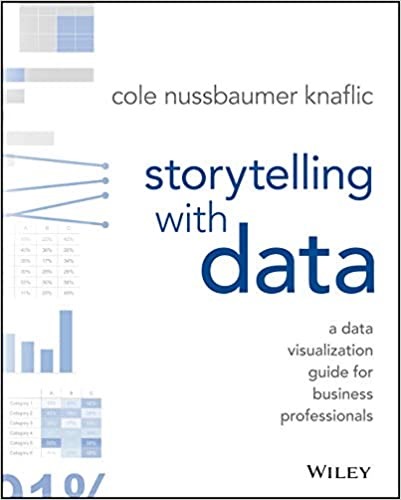
storytellingThis book, Storytelling with data by Cole Nussbaumer Knaflic, fits in with my work, and my interests. It relates to data visualisation, an area in which I have read a number of books including The Visual Display of Quantitative Information by Edward R. Tufte, Visualize This by Nathan Yau, Data Visualization: a successful design process by Andy Kirk and Interactive Data Visualization for the web by Scott Murray. These range from the intensely theoretical (Tufte) to the deeply technical (Murray).

Storytelling with data is closest in content to Andy Kirk’s book and his website is cited in the (very good) additional resources list. A second similarity with Andy Kirk’s book is that Storytelling is “the book of the course” –  the book is derived from her the author’s training courses.

The differentiating factor with Knaflic’s book is the focus on storytelling, presenting a case to persuade rather than focussing on on the production of a data visualisation, although that is part of the process. The book is divided into 6 key lessons, each of which gets a chapter, with a couple of chapters of examples, an introduction and an epilogue this makes 10 chapters. The six key lessons are:

1. understand the context
2. choose an appropriate visual display
3. eliminate clutter
4. focus attention where you want it
5. think like a designer
6. tell a story

I think I got the most out of the understand the context and tell a story chapters, technically I am quite experienced but my knowledge is around how to make charts and process the data to make charts rather than telling a story. The understanding the context chapter talks about the “Big Idea” and the “3-minutes story”. The Big Idea is the single idea you are trying to get across in a presentation, and the 3-minute story is the elevator pitch – how you would put your story into 3 minutes. I liked a callout box with a list of verbs (accept, agree, begin, believe…) used to prompt you for what action you want your audience to take having seen your presentation.

The chapter on choosing an appropriate visual display is quite straightforward, Knaflic presents the 12 types of display she finds herself using frequently (which includes simple text, and text tables). This is a fairly small set since variations of bar charts – horizontal, vertical, stacked and waterfall cover off 5 types. This is appropriate, if you are telling a story to persuade then you don’t want to be spending your time explaining how your esoteric display works. Knaflic steers away from specific technology, only mentioning at the beginning of the book that all the charts shown were made in Microsoft Excel and Adobe Illustrator was sometimes used to get a chart looking just right at the end of the process.

There is a list of sins in data visualisation including the reviled pie chart, and 3D plots but perhaps surprisingly the use of secondary axes to plot data on different scales together.

The chapters on eliminate clutter, focus attention where you want it, and think like a designer are all about making sure that the viewer is paying attention where you want them to pay attention. Some of this is about the Tuftian “eliminate clutter” much of which creeps into charts through default behaviour in software. Some is about using gestalt theories of attention to group items together through similarity, proximity and so forth and some is about using pre-attentive attributes such as colour and type face to draw attention to certain elements. This reminded me of The Programmer’s Brain by Felienne Hermans, which links theories of how our brain works with the practices of programming.

The chapter on tell a story introduces some resources on storying telling from playwrights and screenwriters – basically the idea of the three act play with a setup, conflict and resolution. This is a different way of thinking for me, my presentations tend to follow the traditional structure of a scientific paper but it is interesting to see the link with creative writing and drama – which is generally excluded from scientific writing.

One of the lessons I learnt from this book was to make better use of of chart titles and PowerPoint titles, I tend to go for  descriptive chart titles (“Ticket Trend”, to use an example from the book) and PowerPoint titles which simply labelled a section of a talk (“Methodology”). Knaflic encourages us to use this valuable “real estate” in a presentation for a call to action: “Please Approve the Hire of 2 FTEs”.

The six lessons are reinforced with a chapter which covers a single worked example from beginning to end, and another chapter of case studies which looks at fixing particular issues with single charts.

I enjoyed this book, its beautifully produced and fairly easy reading. It also led me to buy two more books Resonate by Nancy Duarte and Data Points by Nathan Yau, and so the “to be read” pile grows again!
Book review: The Information Capital by James Cheshire and Oliver Uberti

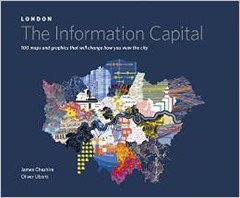
Today I review TheInformationCapitalThe Information Capital by James Cheshire and Oliver Uberti – a birthday present. This is something of a coffee table book containing a range of visualisations pertaining to data about London. The book has a website where you can see what I’m talking about (here) and many of the visualisations can be found on James Cheshire’s mappinglondon.co.uk website.

This type of book is very much after my own heart, see for example my visualisation of the London Underground. The Information Capital isn’t just pretty, the text is sufficient to tell you what’s going on and find out more.

The book is divided into five broad themes “Where We Are”, “Who We Are”, “Where We Go”, “How We’re Doing” and “What We Like”. Inevitably the majority of the visualisations are variants on a coloured map but that’s no issue to my mind (I like maps!).

Aesthetically I liked the pointillist plots of the trees in Southwark, each tree gets a dot, coloured by species and the collection of points marks out the roads and green spaces of the borough. The twitter map of the city with the dots coloured by the country of origin of the tweeter is in similar style with a great horde evident around the heart of London in Soho.

The visualisations of commuting look like thistledown, white on a dark blue background, and as a bonus you can see all of southern England, not just London. You can see it on the website (here). A Voroni tessellation showing the capital divided up by the area of influence (or at least the distance to) different brands of supermarket is very striking. To the non-scientist this visualisation probably has a Cubist feel to it.

Some of the charts are a bit bewildering, for instance a tree diagram linking wards by the prevalent profession is confusing and the colouring doesn’t help. The mood of Londoners is shown using Chernoff faces, this is based on data from the ONS who have been asking questions on life satisfaction, purpose, happiness and anxiety since 2011. On first glance this chart is difficult to read but the legend clarifies for us to discover that people are stressed, anxious and unhappy in Islington but perky in Bromley. You can see this visualisation on the web site of the book (here).

The London Guilds as app icons is rather nice, there’s not a huge amount of data in the chart but I was intrigued to learn that guilds are still being created, the most recent being the Art Scholars created in February 2014. Similarly the protected views of London chart is simply a collection of water-colour vistas.

I have mixed feelings about London, it is packed with interesting things and has a long and rich history. There are even islands of tranquillity, I enjoyed glorious breakfasts on the terrace of Somerset House last summer and lunches in Lincoln’s Inn Fields.  But I’ve no desire to live there. London sucks everything in from the rest of the country, government sits there and siting civic projects outside London seems a great and special effort for them. There is an assumption that you will come to London to serve. The inhabitants seem to live miserable lives with overpriced property and hideous commutes, these things are reflected in some of the visualisations in this book. My second London Underground visualisation measured the walking time between Tube station stops, mainly to help me avoid that hellish place at rush hour. There is a version of such a map in The Information Capital.

For those living outside London, The Information Capital is something we can think about implementing in our own area. For some charts this is quite feasible based, as they are, on government data which covers the nation such as the census or GP prescribing data. Visualisations based on social media are likely also doable although will lack weight of numbers. The visualisations harking back to classics such as John Snow’s cholera map or Charles Booth’s poverty maps of are more difficult since there is no comparison to be made in other parts of the country. And other regions of the UK don’t have Boris Bikes (or Boris, for that matter) or the Millennium Wheel.

It’s completely unsurprising to see Tufte credited in the end papers of The Information Capital. There are also some good references there for the history of London, places to get data and data visualisation.

I loved this book, its full of interesting and creative visualisations, an inspiration!

Inordinately fond of beetles… reloaded!

sciencemuseum_logo

This post was first published at ScraperWiki.

Some time ago, in the era before I joined ScraperWiki I had a play with the Science Museums object catalogue. You can see my previous blog post here. It was at a time when I was relatively inexperienced with the Python programming language and had no access to Tableau, the visualisation software. It’s a piece of work I like to talk about when meeting customers since it’s interesting and I don’t need to worry about commercial confidentiality.

The title comes from a quote by J.B.S. Haldane, who was asked what his studies in biology had told him about the Creator. His response was that, if He existed then he was “inordinately fond of beetles”.

The Science Museum catalogue comprises three CSV files containing information on objects, media and events. I’m going to focus on the object catalogue since it’s the biggest one by a large margin – 255,000 objects in a 137MB file. Each object has an ID number which often encodes the year in which the object was added to the collection; a title, some description, it often has an “item name” which is a description of the type of object, there is sometimes information on the date made, the maker, measurements and whether it represents part or all of an object. Finally, the objects are labelled according to which collection they come from and which broad group in that collection, the catalogue contains objects from the Science Museum, Nation Railway Museum and National Media Museum collections.

The problem with most of these fields is that they don’t appear to come from a controlled vocabulary.

Dusting off my 3 year old code I was pleased to discover that the SQL I had written to upload the CSV files into a database worked almost first time, bar a little character encoding. The Python code I’d used to clean the data, do some geocoding, analysis and visualisation was not in such a happy state. Or rather, having looked at it I was not in such a happy state. I appeared to have paid no attention to PEP-8, the Python style guide, no source control, no testing and I was clearly confused as to how to save a dictionary (I pickled it).

In the first iteration I eyeballed the data as a table and identified a whole bunch of stuff I thought I needed to tidy up. This time around I loaded everything into Tableau and visualised everything I could – typically as bar charts. This revealed that my previous clean up efforts were probably not necessary since the things I was tidying impacted a relatively small number of items. I needed to repeat the geocoding I had done. I used geocoding to clean up the place of manufacture field, which was encoded inconsistently. Using the Google API via a Python library I could normalise the place names and get their locations as latitude – longitude pairs to plot on a map. I also made sure I had a link back to the original place name description.

The first time around I was excited to discover the Many Eyes implementation of bubble charts, this time I now realise bubble charts are not so useful. As you can see below in these charts showing the number of items in each subgroup. In a sorted bar chart it is very obvious which subgroup is most common and the relative sizes of the subgroup. I’ve coloured the bars by the major collection to which they belong. Red is the Science Museum, Green is the National Rail Museum and Orange is the National Media Museum.

image

Less discerning members of ScraperWiki still liked the bubble charts.

image

We can see what’s in all these collections from the item name field. This is where we discover that the Science Museum is inordinately fond of bottles. The most common items in the collection are posters, mainly from the National Rail Museum but after that there are bottles, specimen bottles, specimen jars, shops rounds (also bottles), bottle, drug jars, and albarellos (also bottles). This is no doubt because bottles are typically made of durable materials like glass and ceramics, and they have been ubiquitous in many milieu, and they may contain many and various interesting things.

image

Finally I plotted the place made for objects in the collection, this works by grouping objects by location and then finding latitude and longitude for those group location. I then plot a disk sized by the number of items originating at that location. I filtered out items whose place made was simply “England” or “London” since these made enormous blobs that dominated the map.


image


You can see a live version of these visualisation, and more on Tableau Public.

It’s an interesting pattern that my first action on uploading any data like this to Tableau is to do bar chart frequency plots for each column in the data, this could probably be automated.

In summary, the Science Museum is full of bottles and posters, Tableau wins for initial visualisations of a large and complex dataset.

Visualising the London Underground with Tableau

This post was first published at ScraperWiki.

I’ve always thought of the London Underground as a sort of teleportation system. You enter a portal in one place, and with relatively little effort appeared at a portal in another place. Although in Star Trek our heroes entered a special room and stood well-separated on platforms, rather than packing themselves into metal tubes.

I read Christian Wolmar’s book, The Subterranean Railway about the history of the London Underground a while ago. At the time I wished for a visualisation for the growth of the network since the text description was a bit confusing. Fast forward a few months, and I find myself repeatedly in London wondering at the horror of the rush hour underground. How do I avoid being forced into some sort of human compression experiment?

Both of these questions can be answered with a little judicious visualisation!

First up, the history question. It turns out that other obsessives have already made a table containing a list of the opening dates for the London Underground. You can find it here, on wikipedia. These sortable tables are a little tricky to scrape, they can be copy-pasted into Excel but random blank rows appear. And the data used to control the sorting of the columns did confuse our Table Xtract tool, until I fixed it – just to solve my little problem! You can see the number of stations opened in each year in the chart below. It all started in 1863, electric trains were introduced in the very final years of the 19th century – leading to a burst of activity. Then things went quiet after the Second World War, when the car came to dominate transport.

Timeline2

Originally I had this chart coloured by underground line but this is rather misleading since the wikipedia table gives the line a station is currently on rather than the one it was originally built for. For example, Stanmore station opened in 1932 as part of the Metropolitan line, it was transferred to the Bakerloo line in 1939 and then to the Jubilee line in 1979. You can see the years in which lines opened here on wikipedia, where it becomes apparent that the name of an underground line is fluid.

So I have my station opening date data. How about station locations? Well, they too are available thanks to the work of folk at Openstreetmap, you can find that data here. Latitude-longitude coordinates are all very well but really we also need the connectivity, and what about Harry Beck’s iconic “circuit diagram” tube map? It turns out both of these issues can be addressed by digitizing station locations from the modern version of Beck’s map. I have to admit this was a slightly laborious process, I used ImageJ to manually extract coordinates.

I’ve shown the underground map coloured by the age of stations below.

Age map2

Deep reds for the oldest stations, on the Metropolitan and District lines built in the second half of the 19th century. Pale blue for middle aged stations, the Central line heading out to Epping and West Ruislip. And finally the most recent stations on the Jubilee line towards Canary Wharf and North Greenwich are a darker blue.

Next up is traffic, or how many people use the underground. The wikipedia page contains information on usage, in terms of millions of passengers per year in 2012 covering both entries and exits. I’ve shown this data below with traffic shown at individual stations by the thickness of the line.

Traffic

I rather like a “fat lines” presentation of the number of people using a station, the fatter the line at the station the more people going in and out. Of course some stations have multiple lines so get an unfair advantage. Correcting for this it turns out Canary Wharf is the busiest station on the underground, thankfully it’s built for it. Small above ground beneath it is a massive, cathedral-like space.

More data is available as a result of a Freedom of Information request (here) which gives data broken down by passenger action (boarding or alighting), underground line, direction of travel and time of day – broken down into fairly coarse chunks of the day. I use this data in the chart below to measure the “commuteriness” of each station. To do this I take the ratio of people boarding trains in the 7am-10am time slot with those boarding 4pm-7pm. For locations with lots of commuters, this will be a big number because lots of people get on the train to go to work in the morning but not many get on the train in the evening, that’s when everyone is getting off the train to go home.

CommuterRatios

By this measure the top five locations for “commuteriness” are:

  1. Pinner
  2. Ruislip Manor
  3. Elm Park
  4. Upminster Bridge
  5. Burnt Oak

It was difficult not to get sidetracked during this project, someone used the Freedom of Information Act to get the depths of all of the underground stations, so obviously I had to include that data too! The deepest underground station is Hampstead, in part because the station itself is at the top of a steep hill.

I’ve made all of this data into a Tableau visualisation which you can play with here. The interactive version shows you details of the stations as your cursor floats over them, allows you to select individual lines and change the data overlaid on the map including the depth and altitude data that.

Messier and messier

Regular readers with a good memory will recall I bought a telescope about 18 months ago. I bemoaned the fact that I bought it in late Spring, since it meant it got dark rather late. I will note here that astronomy is generally incompatible with a small child who might wake you up in the middle of the night, requiring attention and early nights.

Since then I’ve taken pictures of the sun, the moon, Jupiter, Saturn and as a side project I also took wide angle photos of the Milky Way and star trails (telescope not required). Each of these bought their own challenges, and awe. The sun because it’s surprisingly difficult to find the thing in you view finder with the serious filter required to stop you blinding yourself when you do find it. The moon because it’s just beautiful and fills the field of view, rippling through the “seeing” or thermal turbulence of the atmosphere. Jupiter because of it’s Galilean moons, first observed by Galileo in 1610. Saturn because of it’s tiny ears, I saw Saturn on my first night of proper viewing. As the tiny image of Saturn floated across my field of view I was hopping up and down with excitement like a child.

I’ve had a bit of a hiatus in the astrophotography over the past year but I’m ready to get back into it.

My next targets for astrophotography are the Deep Sky Objects (DSOs), these are largish faint things as opposed to planets which are smallish bright things. My accidental wide-angle photos clued me into the possibilities here. I’d been trying to photograph constellations, which turn out to be a bit dull, at the end of the session I put the sensitivity of my camera right up and increased the exposure time and suddenly the Milky Way appeared! Even in rural Wales it was only just visible to the naked eye.

Now I’m keen to explore more of these faint objects. The place to start is the Messier Catolog of objects. This was compiled by Charles Messier and Pierre Méchain in the latter half of the 18th century. You may recognise the name Méchain, he was one of the two French men who surveyed France on the cusp of the Revolution to define a value for the meter. Ken Alder’s book The Measure of All Things, describes their adventures.

Messier and Mechain weren’t interested in the deep sky objects, they were interested in comets and compiled the list in order not to be distracted from their studies by other non-comety objects. The list is comprised of star clusters, nebula and galaxies. I must admit to being a bit dismissive of star clusters. The Messier list is by no means exhaustive, observations were all made in France with a small telescope so there are no objects from the Southern skies. But they are ideal for amateur astronomers in the Northern hemisphere since the high tech, professional telescope of the 18th century is matched by the consumer telescope of the 21st.

I’ve know of the Messier objects since I was a child but I have no intuition as to where they are, how bright and how big they are. So to get me started I found some numbers and made some plots.

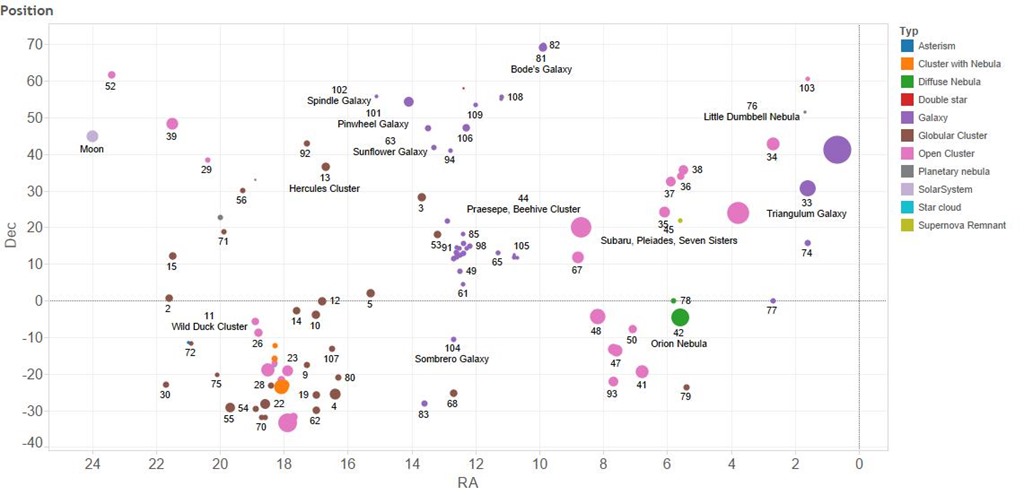
The first plot shows where the objects are in the sky. They are labelled, somewhat fitfully with their Messier number and common name. Their locations are shown by declination, how far away from the celestial equator an object is, towards the North Pole and right ascension, how far around it is along a line of celestial latitude. I’ve added the moon to the plot in a fixed position close to the top left. As you can see the majority of the objects are North of the celestial equator. The size of the symbols indicates the relative size of the objects. The moon is shown to the same scale and we can see that a number of the objects are larger than the moon, these are often star clusters but galaxies such as Andromeda – the big purple blob on the right and the Triangulum Galaxy are also bigger than the moon. As is the Orion nebula.

Position

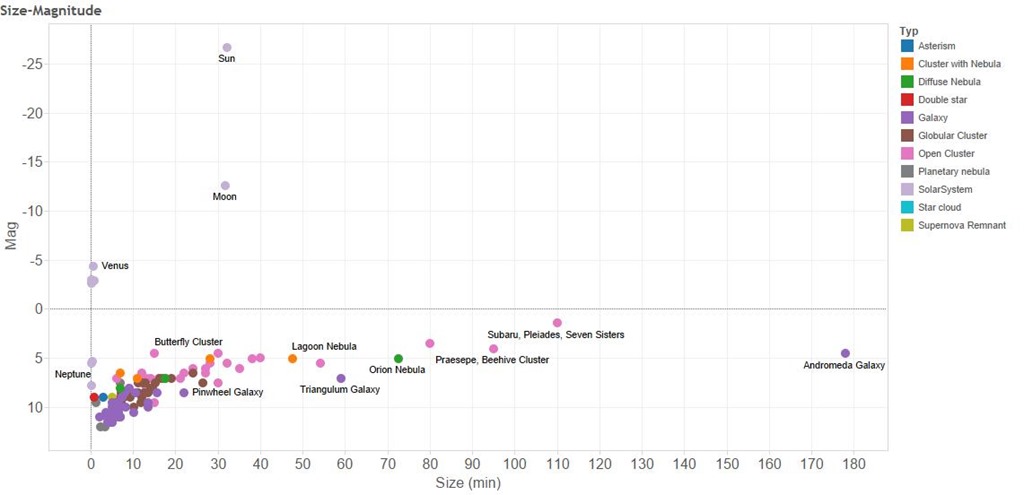
So why aren’t we as familiar with these objects as we are with the moon. The second plot shows how bright the Messier objects are and their size. The horizontal axis shows their apparent size – it’s a linear scale so that an object twice as far from the vertical axis is twice as big. Note that these are apparent sizes, some things appear larger than others because they are closer. The Messier The vertical axis shows the apparent brightness, in astronomy brightness is measured in units of “magnitude” which is a logarithmic scale. This means that although the sun is roughly magnitude –26 and the moon is roughly magnitude –13, the sun is 10,000 times bright than the moon. The Messier objects are all much dimmer than Venus, Jupiter and Mercury and generally dimmer than Saturn.

Size-Magnitude


So the Messier objects are often bigger but dimmer than things I have already photographed. But wait, the moon fills the field of view of my telescope. And not only that my telescope has an aperture of f/10 – a measure of it’s light gathering power. This is actually rather “slow” for a camera lens, my “fastest” lens is f/1.4 which represents a 50 fold larger light gathering power.

For these two reasons I have ordered a new lens for my camera, a Samyang 500mm f/6.3 this is going to give me a bigger field of view than my telescope which has a focal length of 1250mm. And also more light gathering power – my new lens should have more than double the light gathering power!

Watch this space for the results of my new purchase!